
Un texto alternativo ayuda a comprender una imagen cuando no se ve. La IA puede preparar una descripción inicial, pero la decisión de qué necesita esa imagen depende de la página donde aparece. Con SEOPress Pro conviene revisar además qué acción eliges: no todas modifican los mismos campos.
Primero decide qué imágenes necesitan ALT
Selecciona unas pocas imágenes informativas y revisa dónde se utilizan. El ALT debe comunicar lo relevante en ese contexto, sin rellenarlo con palabras clave ni repetir por sistema el pie de foto. Para una imagen puramente decorativa puede corresponder un atributo ALT vacío.
Si la imagen funciona como enlace o botón, importa su función. Si contiene información compleja, una descripción breve puede no bastar: la explicación completa debe estar disponible en la página. Consulta el árbol de decisión de W3C para distinguir estos casos.
Antes de generar, guarda los textos actuales. No incluyas imágenes cuyo ALT ya es correcto solo porque están en la misma página de la biblioteca.
Las acciones de biblioteca tienen efectos distintos
En la vista de lista de Medios, SEOPress Pro ofrece acciones de generación con IA. Presta atención al campo al que se refieren:
| Acción | Efecto que debes tener en cuenta |
|---|---|
| Completar metadatos de imagen ausentes | Puede rellenar ALT, leyenda y descripción que estén vacíos. Conservar un ALT existente no significa que solo cambie ALT. |
| Generar únicamente ALT | Limita el campo modificado al ALT, pero puede sustituir un ALT ya escrito. |
| Generar todos los metadatos | Puede sustituir varios campos. No la elijas si solo buscas ALT. |
Para trabajar únicamente el ALT y mantener la leyenda vacía, selecciona manualmente las imágenes cuyo ALT quieras completar o corregir y utiliza Generar texto alternativo con IA. Revisa la selección antes de aplicar: el control sobre los textos que conservas empieza aquí.
1. Conecta un proveedor que pueda analizar imágenes
Necesitas SEOPress y SEOPress Pro activos y un proveedor compatible con análisis de imágenes. En SEO → PRO → IA, configura tu cuenta API, selecciona un modelo compatible y guarda. La existencia de un modelo en otra herramienta no acredita que esté disponible en el plugin.
El proveedor recibirá la imagen y las instrucciones necesarias para analizarla. Para la primera prueba, usa una imagen propia sin información privada. Mantén las claves fuera de las capturas y revisa el coste de API de tu cuenta: es independiente de la licencia del plugin.
2. Genera solo para las imágenes seleccionadas
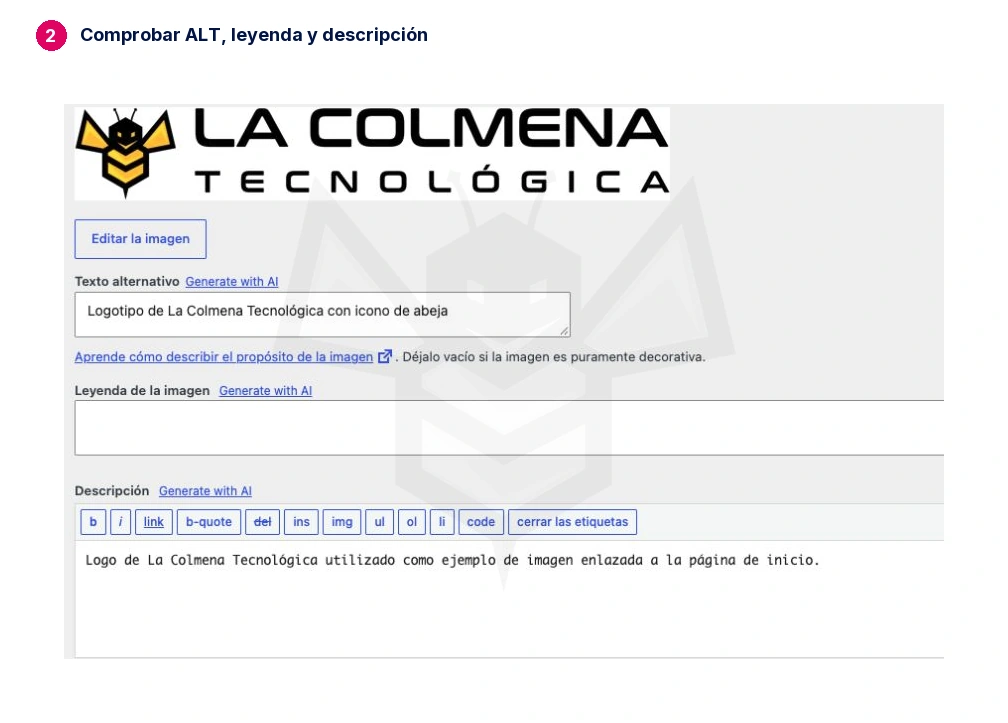
En la biblioteca, cambia a vista de lista. Selecciona dos o tres imágenes informativas con ALT pendiente y ejecuta la acción de solo ALT. Cuando termine, abre cada archivo y comprueba el resultado, la leyenda y la descripción.
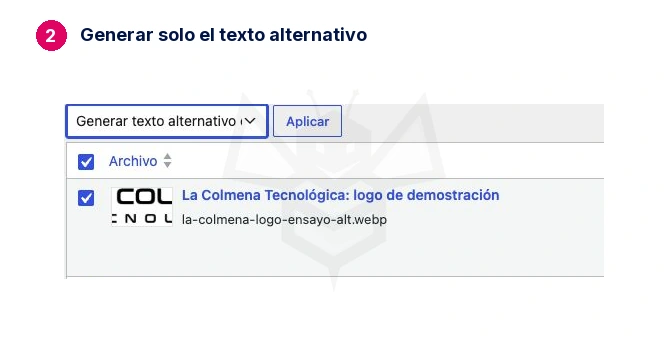
La leyenda debe continuar vacía si así estaba y solo has solicitado ALT. Si encuentras cambios en otros campos, detén el lote y comprueba la acción seleccionada antes de seguir.
El idioma del perfil del administrador no garantiza por sí solo el idioma de salida. Revisa el idioma del sitio y, en instalaciones multilingües, el idioma del archivo y la integración disponible. Verifica un ejemplo por idioma.
3. Revisa la imagen dentro de su página
Una imagen de una taza podría necesitar «Taza de cerámica azul con asa» en un catálogo, pero otra descripción en un tutorial sobre la reparación del asa. La IA que analiza el archivo no conoce necesariamente el propósito de cada aparición.
Abre la página que contiene la imagen. Comprueba que el ALT visible en su HTML coincide con el texto que necesitas: cambiar un archivo de la biblioteca no garantiza que todos los bloques, constructores o usos antiguos actualicen su atributo. Corrige el uso concreto cuando sea necesario.
En la prueba se utilizó el logo propio de La Colmena. La IA describió el logo y la abeja amarilla, pero si esa imagen es el único contenido de un enlace a la portada, un ALT como «La Colmena Tecnológica — Inicio» comunica mejor su función. El resultado automático es una propuesta que debe adaptarse a su uso.
El objetivo es ayudar a comprender el contenido. No conviertas una imagen decorativa en informativa solo para que una lista deje de mostrar campos vacíos.
4. Si quieres generar ALT al subir archivos nuevos
En SEO → PRO → IA, activa la generación de metadatos al subir imágenes. Revisa los campos que aparecen: no aceptes la selección completa por defecto. Deja marcado ALT y desmarca Leyenda y Descripción si no quieres que se generen. Guarda.
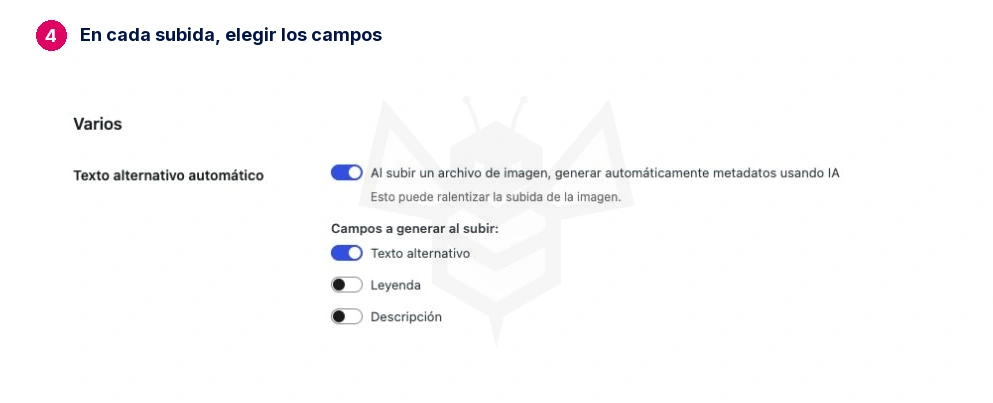
Sube una imagen propia de prueba. Comprueba que se ha creado el ALT, que tiene el idioma adecuado y que la leyenda permanece vacía. Revisa también la descripción. Solo después amplía su uso.
Cuánto puede costar
Como referencia de presupuesto, generar el texto alternativo (ALT) y una descripción breve para 100 imágenes de 1024 × 1024 píxeles costaría alrededor de 0,06 € con GPT-5.6 Luna, antes de impuestos.
Es una estimación para una generación por imagen con textos breves, no un promedio medido. El importe puede variar según el modelo, las dimensiones, la longitud de la respuesta, los reintentos y el tipo de cambio. El consumo de API se paga aparte de la licencia de SEOPress Pro.
Resultado esperado: las imágenes seleccionadas tienen un ALT útil en su contexto; los textos que querías conservar siguen intactos, y leyenda y descripción no han cambiado al solicitar solo ALT.
Fuentes: metadatos de imágenes con SEOPress, decisión de ALT de W3C y tarifa oficial de GPT-5.6 Luna.