

Step-by-step video
Introduction
Create your own design system with global colors and text styles that can be easily assigned to your site’s elements.
Global Colors
Set predefined global colors (primary, secondary, text, and accent colors), custom inline colors, or create new global colors from Elementor’s global settings.
Global
Predefined Global Colors
By default, predefined colors (primary, secondary, text, and accent) are pre-filled from your theme’s CSS. Change them here to override your theme’s settings. Elements affected by the default color palette:
- Primary colors are used for titles and icons.
- Secondary colors are used for list item backgrounds, subheadings, animated headlines, and pricing tables.
- Text colors are used for paragraphs and menu items.
- Accent colors are used for links, button backgrounds, tab and accordion headers, and badges.
Each of the colors will be used in various widgets similar to the examples above. Below are some color examples to help visualize the areas where each color is used.
New Global Colors
In addition to the 4 predefined global colors (primary, secondary, text, and accent), you can add any color you choose to the global palette, for use in any Elementor color option.
Custom Inline Colors
You can also select any custom color for inline use without adding it to the global color palette.
From any Elementor page or post, click the hamburger menu in the top left corner of the Widget Panel, then click Site Settings > in the DESIGN SYSTEM > section, click Global Colors.
- Edit Color: Click the color swatch to select a new color for any existing color. Names can also be changed. Click the color name to rename it. For example, you can change Primary to Titles, Accent to Highlight, etc.
- Add Color: Click the Add Color button to add a new global or inline custom color.
- Delete Color: Hover over the color swatch and click the trash icon that appears.
Hexadecimal Color System
In HTML, the Hex code or hexadecimal code is used to define colors. To better understand how this code is transcribed, let’s look at this chart:

As we can see in the image, after the hash symbol or pound sign #, Hex codes for defining a color have 6 more digits, which define an RGB (Red Green Blue) color. All colors in the spectrum are composed of a mixture of these three base colors. In the Hex code, the first two digits correspond to Red, the middle two to Green, and the last two to Blue.
Imagine you have three cans of paint: one red, one green, and one blue. If you mix these colors in a container, adding a certain amount of each, the result will be a specific color. In this case, it’s exactly the same; depending on the amount of each color we add, we will obtain a specific color.
So far so good, but… Hex codes don’t just have numbers, but also letters. Let’s see why. We are used to working with the decimal system, meaning with a base of 10 digits (0, 1, 2, 3, 4, 5, 6, 7, 8, and 9). Using these digits, we compose any numerical quantity. In the case of Hex color codes, we work with a hexadecimal base, meaning instead of 10, we use 16 digits (0, 1, 2, 3, 4, 5, 6, 7, 8, 9, A, B, C, D, E, and F).
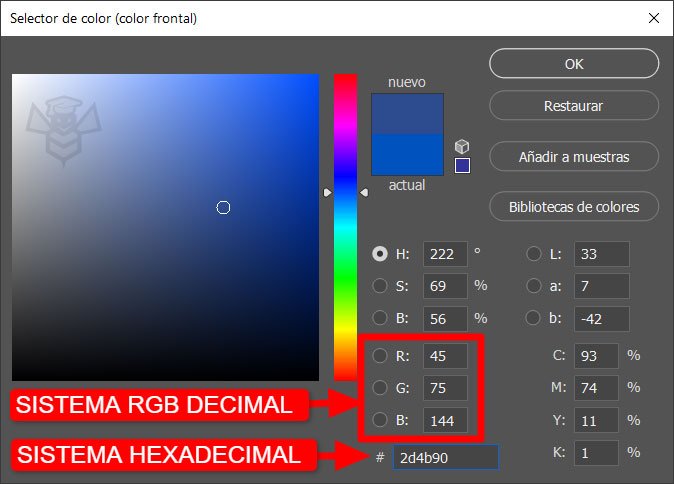
Using only two digits, the lowest hexadecimal value is 00 (equivalent to 0 in decimal) and the highest is FF (equivalent to 255 in decimal), meaning we can add between 0 and 255 to the mixture of each color. Let’s look at some examples represented in hexadecimal form:
- #000000 (Black: in decimal, 0 units of red, 0 of green, and 0 of blue)
- #FFFFFF (White: in decimal, 255 units of red, 255 of green, and 255 of blue)
- #FF0000 (Red: in decimal, 255 units of red, 0 of green, and 0 of blue)
- #00FF00 (Green: in decimal, 0 units of red, 255 of green, and 0 of blue)
- #0000FF (Blue: in decimal, 0 units of red, 0 of green, and 255 of blue)
- #999999 (Gray: in decimal, 153 units of red, 153 of green, and 153 of blue)
With this system, a 24-bit computer can reproduce up to 16,777,216 different colors, a more than sufficient amount, considering that the human eye can only distinguish 10 million colors.
Links of Interest
- Color Theory: Basic Color Guide
- Browser extension with which you can capture the Hex color of any part of a web page: