

Step-by-step video
How to create various types of QR codes through the QRCode Monkey website.
What is a QR code?
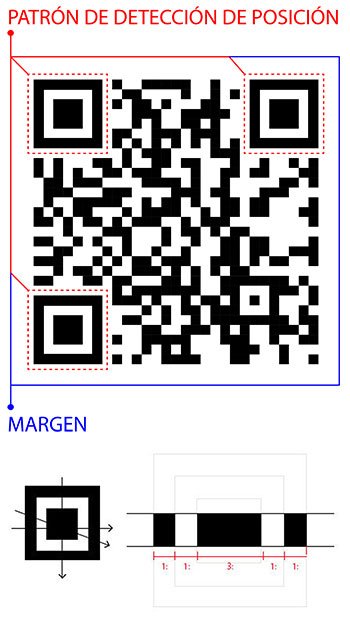
QR codes are a type of barcode or scannable pattern primarily used to contain a URL (link to a website), but they can contain more than just links; we can encode text, phone numbers, emails, contact details, WiFi network access data, and more.
Invented in 1994 by Masahiro Hara, chief engineer at Denso Wave, a Japanese company and subsidiary of Toyota, the QR code was initially used to track vehicles and parts as they moved through the manufacturing process.
Short for Quick Response, QR codes are a type of barcode easily readable with digital devices such as smartphones. They store information as a series of pixels in a grid that can be read in two directions—top to bottom and right to left—unlike standard barcodes which can only be read top to bottom.
QR codes can store around 7,000 digits or about 4,000 characters, including punctuation marks and special characters. They can also encode information such as phone numbers or internet addresses. The layout of each QR code varies depending on the information it contains, which changes the arrangement of its black modules.
The QR code can be captured from any angle; the ratio of black and white areas in a position detection pattern is 1:1:3:1:1.
When creating a code, you can add data to it—though this increases the code’s structure and makes it more complex—and even customize it. Furthermore, the data structure of a QR code contains duplicates, ensuring that even with 30% damage to the code, it will still be readable by a scanner.
While the software used to generate QR codes does not collect users’ personal information, the location and time of a scan, the number of times a code is scanned, and the operating system of the device that performed the scan are available to the code creators.
Important: a QR code cannot be hacked, but a hacker can generate a malicious QR code that sends you to a fake website where they will steal your personal data and may track your location, so always try to verify where your QR code originated from.
What can you do with a QR code?
Today, QR codes are still used to track products and product information through a supply chain, but they are also used for much more. You have likely used a QR code to view a menu in a restaurant, join a social profile, download an app, send and receive payments, access Wi-Fi, and authenticate your login details. The possibilities with QR codes are truly endless.
Denso Wave has also made some significant improvements to the code’s design. QR codes can now come with brand protection, anti-counterfeiting measures, and traceability—all features aimed at improving the QR code experience as they become increasingly common across all industries.
What makes up a QR code?
Visually, a QR code looks like a twisted crossword puzzle, but its design is crucial to its function. Here are some of its most important elements.
- Position detection markers: the prominent squares located in the three corners of each code offer easier recognition and help read the QR code at high speed.
- Alignment markers: these help straighten codes placed on curved surfaces. They are smaller than a position detection marker but grow larger the more information a QR code contains.
- Timing pattern: alternating black and white modules configure the data grid and help the scanner calculate the size of the data matrix.
- Version information: this determines which of the 40 different QR code versions is being used, with versions 1 to 7 being the most common.
- Format information: this pattern contains information about the data mask pattern and the code’s error tolerance, making it easier to scan.
- Data and error correction keys: the error correction function shares a structural space where all the data in a QR code is located. The mechanism of this correction block is essential for allowing up to 30% of a code to be read if it is damaged.
- Quiet zone: this white space can be seen as the border of a QR code to help improve scan comprehension and provide structure. It determines what is and is not part of the code.
How to scan a QR code?
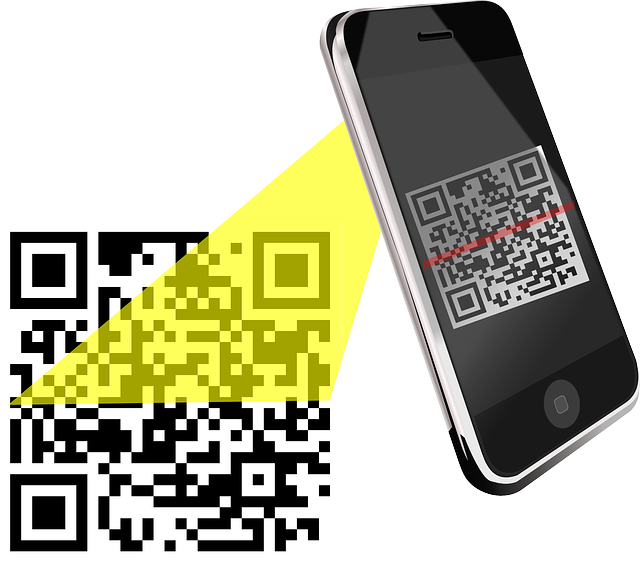
Most smartphones are equipped with a QR reader within the device’s own camera, but if yours doesn’t seem to have one, you can download one from your phone’s app store.
To scan a QR code with your iPhone, open your camera app and, if your device has it, activate your device’s QR code mode. Then, align your camera with the code so that all four corners are in view. Your phone should automatically take a snapshot, and a visible link to the code’s data should appear on the screen.
The process is similar for those who want to scan a QR code with an Android. Open your device’s camera and point it at the QR code; once the code has been scanned, you will see a small icon shaped like a QR code. Tap this icon with your finger to access the information.
Links of interest
- QRCode Monkey: https://www.qrcode-monkey.com/
- Bitly: https://bitly.com
- Lorem Ipsum: https://www.lipsum.com
- Colorzilla: https://www.colorzilla.com